
Skip to content
Clock-In.

Attendance system and sign-in kiosk for New Zealand clubs

Bowls, golf, rifle and pistol, RSA, aero, model engineering — most clubs need to show who used the facility and when, whether that's for a grant application, an incident report, or settling who left the lights on. A sign-in sheet on the bar doesn't add up to numbers you can report. Clock-In is an attendance system for clubs in NZ where members sign in on a tablet at the door and the club builds a clean participation record without anyone keying it in.

30 days free. No credit card required.

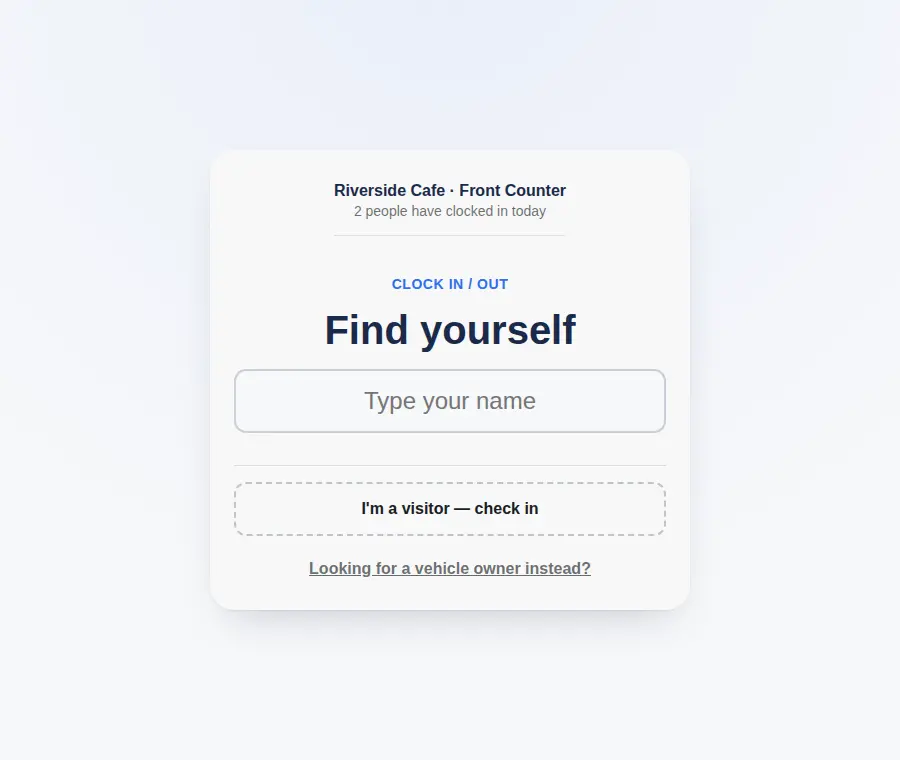
Club member sign in system running as a door kiosk at a New Zealand club
The Clock-In kiosk · no app needed

Members don't need an account or an app. When a grant accountability report is due, the committee runs a funder report — participation numbers broken down by the questions the club chose to ask, such as age group. Clock-In helps you maintain clear attendance records and supports your club's emergency procedures.

Why clubs use Clock-In as their attendance system

A sign-in kiosk at the door, nothing to install

Stand a tablet at the entrance or clubroom door with your club's Clock-In link open. Members tap their name to sign in, with an optional 4-digit PIN; visitors and guests can be added on the spot. No app, no member logins to reset.

Participation numbers for grant reports

Run a funder report for any date range and download it as a PDF and CSV: total visits, visits per day, and participation broken down by each question you ask at sign-in — age group, for example. Groups of fewer than five people are hidden, so it is ready to share with a funder.

Your own questions for members and guests

Set up a sign-in form with the questions your grant reporting needs: member or guest, age group, first visit, how they heard about the club. Guests can also be asked to accept your health and safety notice before they sign in.

See who's using the facility now

Open the live view to see who is on site and which sessions are busy. Useful for bar staff, duty managers, and knowing whether the club is actually being used on a Tuesday afternoon.

Roll call if you need to clear the building

If there's a fire or an earthquake, start a roll call from the live list and confirm each person safe in a tap. Drills and real events are saved.

How the club sign-in kiosk works

  1. 1

    Open the link on a tablet at the door

    Put your club's Clock-In link on a tablet by the entrance. Print the QR code alongside it for phone sign-ins.

  2. 2

    Members tap their name

    Each member taps in as they arrive, with an optional PIN. Tapping out when they leave is one tap. Anyone signing in through a form answers your questions as they sign in.

  3. 3

    Live list, roll call and funder reports

    Committee and duty staff see who's in from any device, and can switch the same list to a roll call in an emergency. When a grant report is due, run a funder report as a PDF and CSV.

Flat monthly pricing,
not per person.

See full pricing

Start with a free 30-day trial — up to 25 people, no credit card. After that, Starter is NZ$29 a month for up to 25 people, and Growth is NZ$79 a month for up to 200 people with multiple locations. It is one flat fee for your organisation, however many people sign in.

Club sign-in and attendance questions

Can we get attendance records for grant funding from this?

Yes. Visits made through a sign-in form go into a funder report you can download as a PDF and CSV for any date range: total visits, visits per day, and participation broken down by each question you ask, such as age group. Groups of fewer than five people are hidden. Member sign-ins are time-stamped too and export to CSV.

Do club members need an app or a login?

No. Clock-In opens in a browser on the club's tablet. Members tap their name to sign in — there's no app to install and no member account or password.

Can we track different activities or sections separately?

Set up a location for each area or clubroom that has its own sign-in point. Each one keeps its own attendance list and can show its own sign-in form, so bowls, the range, and the bar can be reported on separately. Multiple locations are included on the Growth plan.

How do guests and visitors sign in?

Guests can be added at the kiosk without setting up a full member record, so your headcount and your roll call still include everyone in the building. If you want to know more about them, a guest sign-in form can ask your own questions — such as member or guest, and how they heard about the club.

Is the funder report safe to share?

It is designed to be shared. A funder report shows totals and breakdowns only — no names and no exact sign-in times. Any group with fewer than five people is hidden, and free-text answers to questions you mark as sensitive are left out. Your club chooses what to ask, so check what you collect before you send it.

What does an attendance system for a club cost in NZ?

Starter is NZ$29 a month for up to 25 members; Growth is NZ$79 a month for up to 200 and includes multiple locations. Sign-in forms and funder reports are included in every plan. It is a flat monthly fee for the club, not per member, with a free 30-day trial and no credit card to start.

Clock-In helps you maintain clear attendance records and supports your workplace emergency procedures. For the wider picture, see Employment New Zealand — Record-keeping and WorkSafe — Workplace emergency plans.

Set your group up
in a few minutes.