
For community houses, centres & halls

Attendance tracking and roll call for New Zealand community centres

Community houses, centres and halls run a dozen different groups through the same rooms in a week — playgroup, ESOL, exercise classes, the budgeting service, the hall hire on Saturday. Funders and grant bodies want to see how many people each programme reached, and a clipboard on the front desk rarely produces a clean number. Clock-In does community centre attendance tracking in NZ by letting people sign in on a tablet at the door, so every programme builds its own headcount automatically.

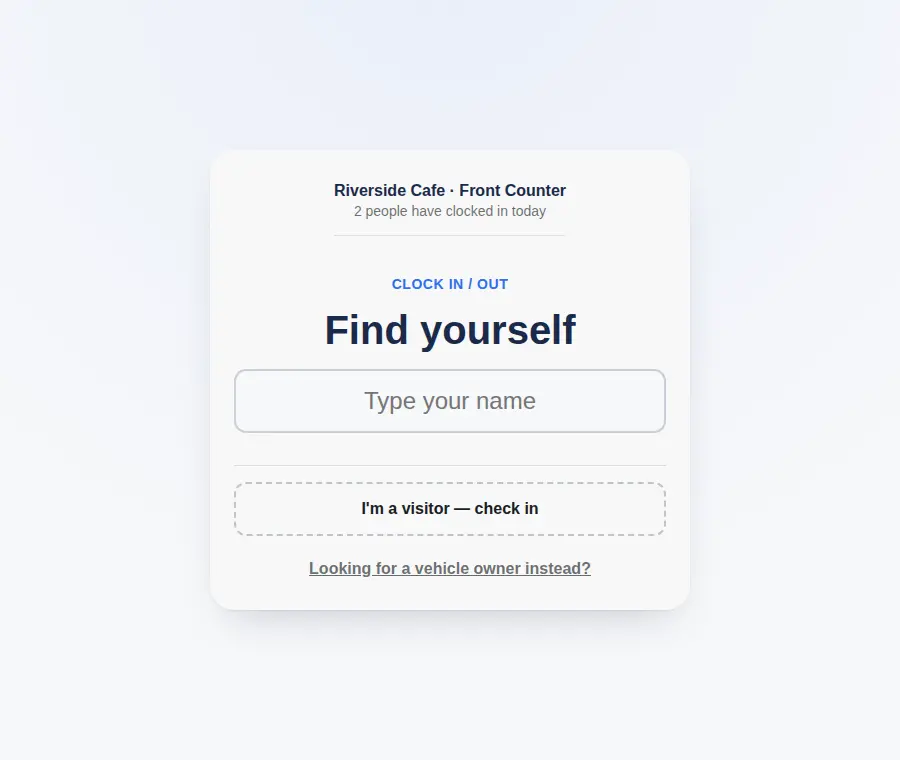
Community centre attendance tracking on a reception sign-in tablet in New Zealand

Visitors don't need an app or an account. Coordinators see who's in the building live, and pull per-programme attendance whenever a report is due. Clock-In helps you maintain clear attendance records and supports your building's emergency procedures.

What community centre attendance tracking looks like with Clock-In

Attendance records for funding reports

Every sign-in is dated and time-stamped. Export to CSV to get attendance totals per programme and per week — the participation evidence funding reports ask for, without anyone counting a paper sheet.

Per-programme headcounts

Give each regular group or room its own sign-in point. Playgroup numbers stay separate from the exercise class, so you can report on each one on its own.

A door kiosk with no app for visitors

A tablet at reception shows your centre's sign-in screen. Visitors tap their name, or add themselves as a one-off, and they're done. Nothing to download.

See who's in the building now

The live view shows everyone currently signed in across every room — useful for reception, for lock-up, and for knowing which spaces are in use.

One-tap roll call in an evacuation

If you have to clear the building, start a roll call from the live list and confirm each person safe. Drills and real events are recorded.

How sign-in works at a community house

  1. Step 1

    Open the link on a tablet at reception

    Put your centre's Clock-In link on a tablet at the front desk, with a printed QR code for people who prefer their phone.

  2. Step 2

    People tap their name

    Visitors and regulars tap in when they arrive and tap out when they leave. An optional PIN keeps similar names apart.

  3. Step 3

    Live list and one-tap roll call

    Coordinators see who's in from any device and can switch to a roll call in an emergency. Per-programme attendance exports to CSV for reporting.

Flat monthly pricing, not per person

Start with a free 30-day trial — up to 25 people, no credit card. After that, Starter is NZ$29 a month for up to 25 people, and Growth is NZ$79 a month for up to 200 people with multiple locations. It is one flat fee for your organisation, however many people sign in.

See full pricing →

Community centre sign-in questions

Can we get attendance records for funding reports?
Yes. Clock-In keeps a dated, time-stamped record of every sign-in, which exports to CSV. You can report attendance per programme and per period for funders and grant accountability reporting.
Do visitors need to download an app?
No. The sign-in screen runs in a browser on your centre's tablet. Visitors tap their name, or add themselves as a one-off visitor — no app, no account.
Can we count each programme or class separately?
Yes. Set up a separate sign-in point per room or programme and each keeps its own attendance list. Multiple locations are included on the Growth plan.
Is there a sign in system for a community house with lots of casual visitors?
Casual visitors can be added at the kiosk in a couple of taps without a full record, so drop-ins still show up in your headcount and your roll call.
What does it cost for a community centre?
Starter is NZ$29 a month for up to 25 people; Growth is NZ$79 a month for up to 200 and includes multiple locations. It is a flat monthly fee for the centre, not per person, with a free 30-day trial and no credit card.

Useful references

Clock-In helps you maintain clear attendance records and supports your workplace emergency procedures. For the wider picture, see Employment New Zealand — Record-keeping and WorkSafe — Workplace emergency plans.

Set your group up in a few minutes