One sign-in, no app for attendees
People tap their name on a tablet or scan a QR code. No downloads, no accounts, no passwords — which matters when your members span every level of tech comfort.
 Clock-In.
 If your group meets in a physical place — a shed, a clubroom, a hall, a tower — you probably need to know who turned up and be able to account for them if something goes wrong. Clock-In is an attendance app for community groups in New Zealand that does both from one simple sign-in: people tap their name on a tablet, the group gets a live list of who's on site, and that same list turns into a roll call in an emergency.
30 days free. No credit card required.
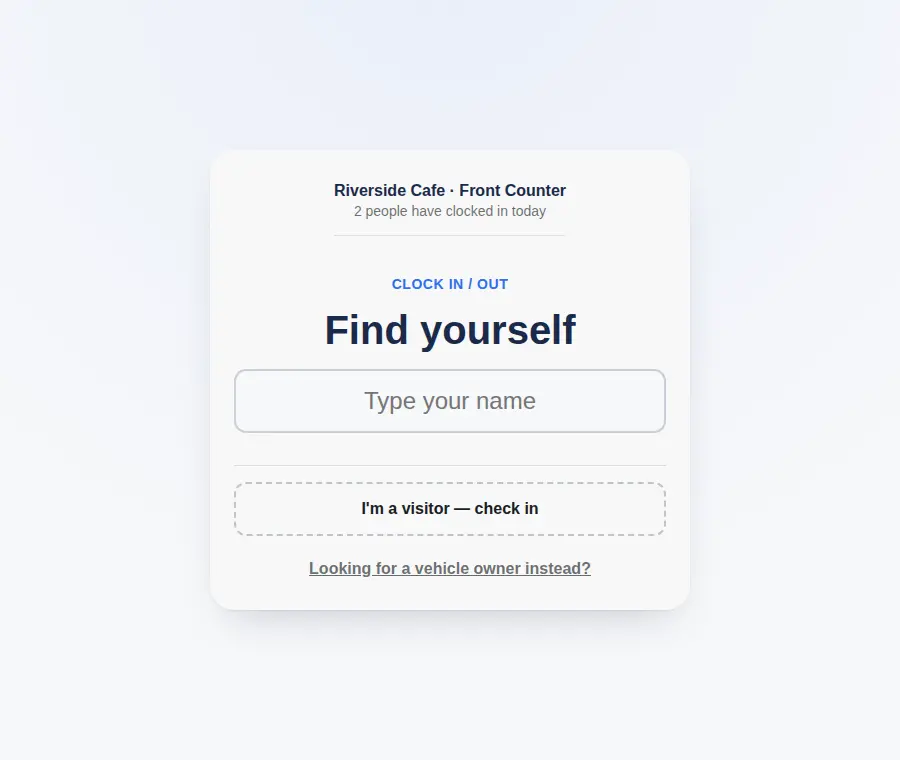
Attendees never need an account or an app. Pricing is a flat monthly fee for the group, not per person. Pick the page closest to your group below, or read on for how it works. Clock-In helps you maintain clear attendance records and supports your emergency procedures.
People tap their name on a tablet or scan a QR code. No downloads, no accounts, no passwords — which matters when your members span every level of tech comfort.
See who's on site right now, per location. It's a current list you can act on, not a report you assemble later.
Start a roll call from the live attendance list and confirm each person safe in a tap. Every drill and real muster is saved.
Every clock-in and roll call exports to CSV for your committee, your funders, or an incident review.
Put your group's Clock-In link on a tablet where people arrive. A printed QR code lets people sign in from their phone instead.
Everyone taps in on arrival and out when they leave, with an optional 4-digit PIN to keep similar names apart.
Organisers see who’s on site from any device, and switch the same list to a roll call in an emergency. Everything exports to CSV.
Start with a free 30-day trial — up to 25 people, no credit card. After that, Starter is NZ$29 a month for up to 25 people, and Growth is NZ$79 a month for up to 200 people with multiple locations. It is one flat fee for your organisation, however many people sign in.
Any group whose activity is tied to a place: men's sheds, sports and social clubs, community houses and halls, surf lifesaving clubs, and similar volunteer or membership groups. If people gather somewhere and you need to know who's there, it fits.
No. Clock-In runs in a web browser on your tablet. People tap their name to sign in — no app to install, no account, no password.
It's built from the live attendance list. Start a roll call, and everyone currently signed in appears; you tap each person as confirmed safe. The roll call is timed and saved. It supports your emergency procedures but does not replace your emergency plan, wardens, or evacuation drills.
A free 30-day trial for up to 25 people, no credit card. After that, Starter is NZ$29 a month for up to 25 people and Growth is NZ$79 a month for up to 200 with multiple locations. It is a flat monthly fee for the group, not per person.
Yes. There's a shared live demo you can try right now — open it and type a name to see the sign-in flow. The 30-day trial then gives you the full product with your own members and locations.
Clock-In helps you maintain clear attendance records and supports your workplace emergency procedures. For the wider picture, see Employment New Zealand — Record-keeping and WorkSafe — Workplace emergency plans.